Chrome · Brave · Edge · Arc
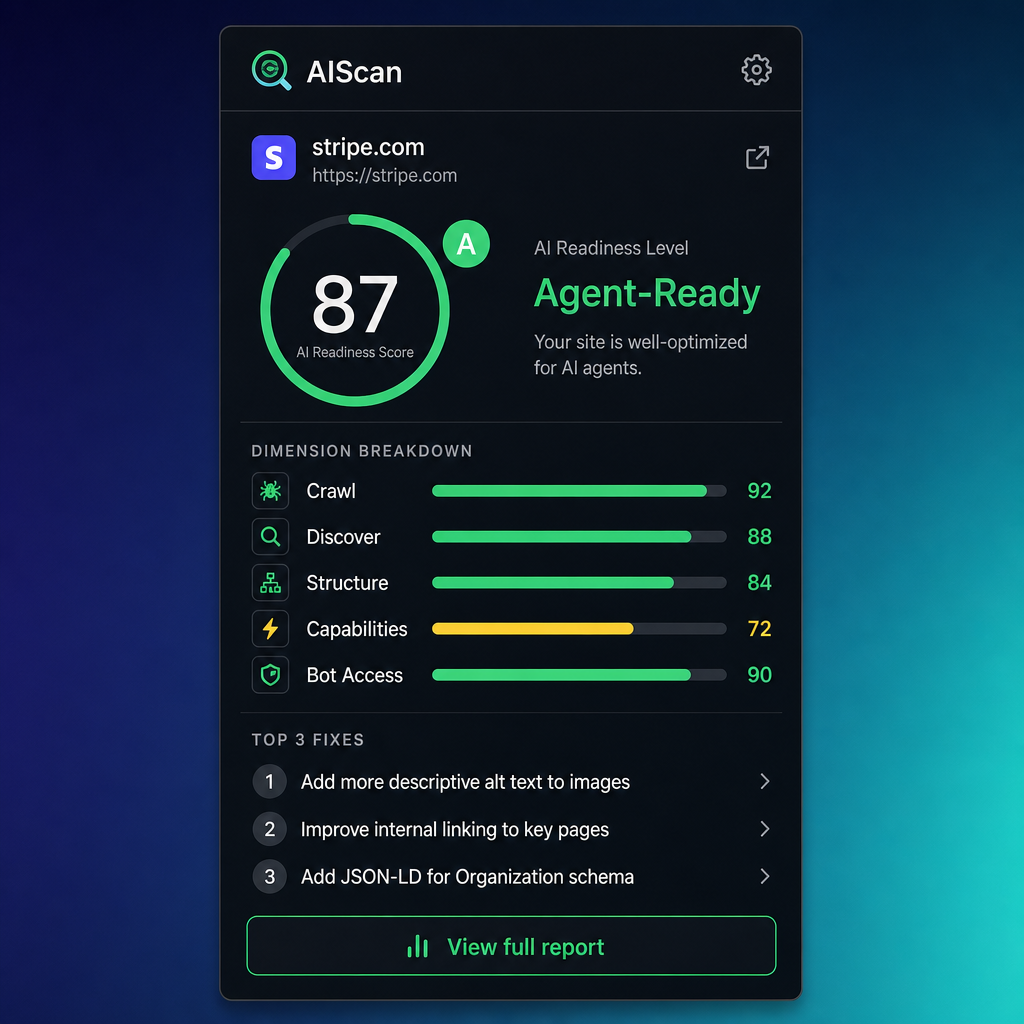
Scan any site from your toolbar.
The AIScan Chrome extension runs a full AI-readiness scan on whatever page you're on. Get the score, grade, and the top fixes in seconds — no copy-paste.
One-click scan
Opens the popup, hits the public API, shows results in 5–15 seconds.
Top fixes
See the three biggest issues right in the popup, plus a link to the full report.
Local-first
The extension only talks to aiscan.site. Your API key never leaves your browser.
Install in 30 seconds
- 1Download the extension ZIP and unzip it somewhere you'll remember.
- 2Open
chrome://extensionsin Chrome (or any Chromium-based browser: Edge, Brave, Arc, Opera). - 3Toggle Developer mode on (top-right corner).
- 4Click Load unpacked and pick the unzipped folder.
- 5Pin the AIScan icon to your toolbar and click it on any site.
A Chrome Web Store listing is in the works. Until then, "Load unpacked" is the install path.
Optional — connect your account
Lift the rate limit with an API key
Anonymous scans are capped at 5 per minute per IP. Generate a personal API key and paste it into the extension's Settings to remove the limit.
- Sign in at aiscan.site/auth.
- Open your profile and generate a key (anything labeled "Chrome extension" works).
- In the AIScan popup, click the gear icon and paste the key. Done.
Prefer the web? Run a scan on aiscan.site — same engine, same results.