Table of contents
- Quick summary
- Why Google sees your React site and ChatGPT does not
- The distinction people get wrong
- Step 1: run the scan
- Step 2: check it by hand
- Four sites, measured
- The seven patterns that cause it in Next.js
- The Next.js 16 detail worth knowing
- Other stacks, same trap
- How to verify the fix worked
- What AIScan cannot see
- When this does not matter
- Maintenance
- Your next step
Googlebot runs your JavaScript. The crawlers that build ChatGPT's and Claude's indexes, as far as anyone has measured, do not. That gap is why a React or Next.js site can hold page one on Google and still be missing from the answer an AI assistant gives about your own product.
You can find out which side of the gap you are on in about thirty seconds, and the fix is usually a configuration change rather than a rewrite. This guide covers the mechanism, the exact commands, four live sites measured on 28 August 2026 (one of them ours, and it failed), and the seven patterns in Next.js that cause it.
Quick summary
| If you want to… | Do this | What it tells you | Time |
|---|---|---|---|
| Know whether you have the problem at all | Run a scan at AIScan or npx aiscan-cli yoursite.com | Checks C3 (structured HTML), E3 (server-rendered text and heading outline), C1 (Markdown negotiation) and C2 (llms.txt) in one pass | 30 seconds |
| Check by hand | curl the page, strip the scripts, count the words | The word count a non-JavaScript fetcher receives | 1 minute |
| Find a broken server render | Grep the HTML for <!--$!--> | React gave up server-rendering that section and handed it to the browser | 10 seconds |
| Tell a real fix from a fake one | Compare word count inside vs outside <script> tags | Whether your text is in real HTML or only in the React flight payload | 2 minutes |
The short answer: if a plain curl of your page returns fewer than about 150 words of readable text and no <h2> headings, retrieval crawlers are getting an empty page from you, whatever Google shows.
The honest caveat, stated up front: the last first-party measurement of AI-crawler JavaScript execution is Vercel and MERJ's study from 17 December 2024. No crawler operator publishes a rendering statement, and no independent 2026 replication exists. The correct claim is "as last measured, they did not render, and nobody has said otherwise since", not "AI crawlers cannot render JavaScript."
Why Google sees your React site and ChatGPT does not
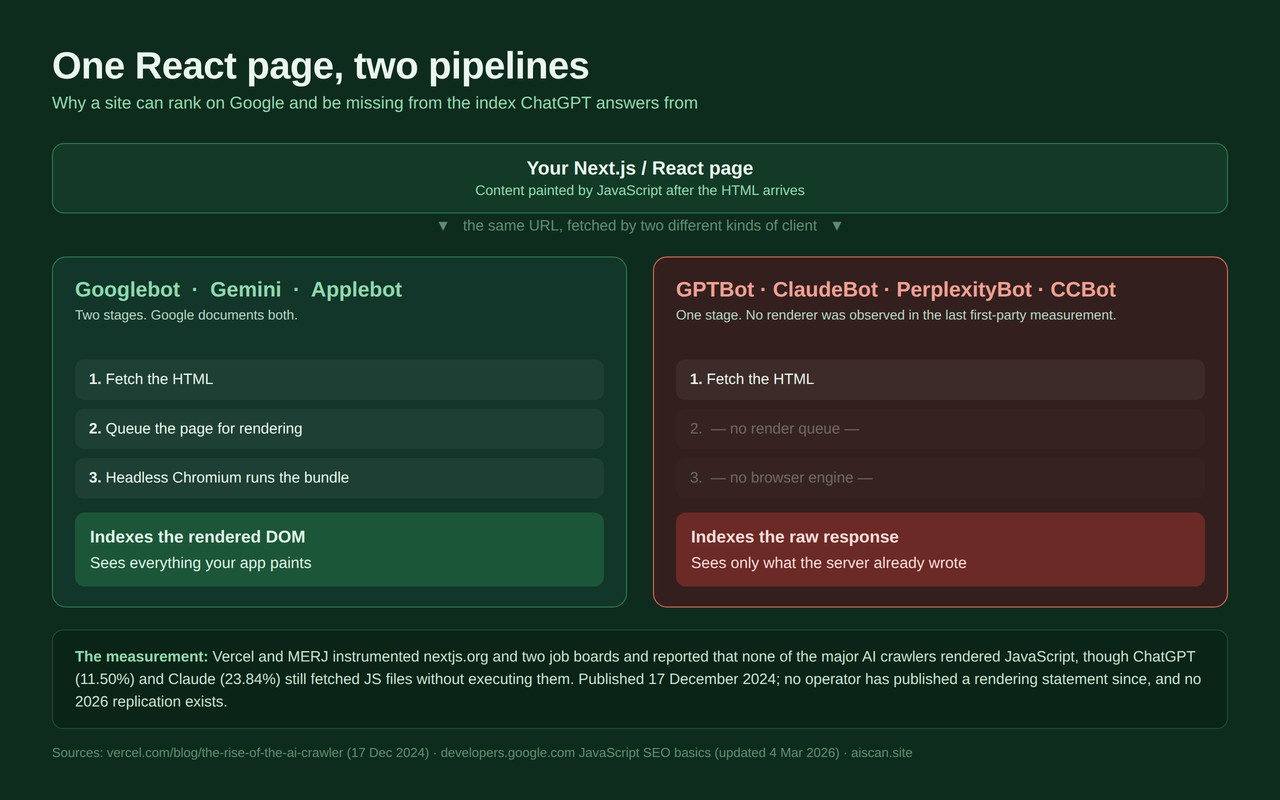
Two pipelines, one page.
Google's is documented and has two stages. Per Google's JavaScript SEO basics (last updated 4 March 2026): "Googlebot queues all pages with a 200 HTTP status code for rendering… Once Google's resources allow, a headless Chromium renders the page and executes the JavaScript." And then the sentence that matters: "Google also uses the rendered HTML to index the page."
So Google indexes the DOM after your bundle has run. Whatever your React app paints, Google reads.
The retrieval crawlers behind AI assistants take one stage. Vercel and MERJ instrumented nextjs.org plus two job boards and reported, verbatim: "The results consistently show that none of the major AI crawlers currently render JavaScript. This includes: OpenAI (OAI-SearchBot, ChatGPT-User, GPTBot), Anthropic (ClaudeBot), Meta (Meta-ExternalAgent), ByteDance (Bytespider), Perplexity (PerplexityBot)."
They also measured the near miss: "while ChatGPT and Claude crawlers do fetch JavaScript files (ChatGPT: 11.50%, Claude: 23.84% of requests), they don't execute them. They can't read client-side rendered content."
Two crawlers sit on the Google side of the line. Vercel found that "Google's Gemini leverages Googlebot's infrastructure, enabling full JavaScript rendering", and that "AppleBot renders JavaScript through a browser-based crawler, similar to Googlebot." Google's own docs explain why: Google-Extended "doesn't have a separate HTTP request user agent string. Crawling is done with existing Google user agent strings; the robots.txt user-agent token is used in a control capacity." It is a permission token, not a crawler, so Gemini inherits Googlebot's renderer.
The distinction people get wrong
A retrieval crawler is not an agentic browser, and conflating them produces bad advice in both directions.
| Retrieval crawlers | Agentic browsers | |
|---|---|---|
| Examples | GPTBot, OAI-SearchBot, ClaudeBot, Claude-SearchBot, PerplexityBot, CCBot | ChatGPT's browsing agent, Perplexity Comet, Gemini in Chrome |
| What they are | Fetchers building an index | A real browser engine driven by a model |
| JavaScript | Not executed, per Vercel/MERJ Dec 2024 | Executed, by definition |
| What they feed | The corpus an assistant answers from when nobody is browsing | One live session, one user, one page |
Both statements are true at once. Your React site can be perfectly usable by an agent that opens it in a browser and completely absent from the index ChatGPT answers from when no browser is involved. The second case is the one that decides whether you get mentioned at all.
Step 1: run the scan
The fastest route is a scan, because the checks are already written down and it reads the page the way a non-rendering fetcher does.
Paste your URL at aiscan.site, or run it locally with no account:
npx aiscan-cli yoursite.com
Four checks answer this question directly, and they are worth reading in this order:
- E3 — heading hierarchy and server-rendered text is the one that matters here. AIScan strips scripts and styles from the HTML your server actually returns, counts the remaining words and the
<h2>/<h3>outline, and scores 2 points for 150+ words of server-rendered text (1 point for 50+), plus 2 points for two or more<h2>sections. A client-rendered app scores 0 or 1. - C3 — structured HTML wants a single
<h1>, a non-empty<title>, a meta description and at least one JSON-LD block. A shell page fails most of these because the components that emit them never run on the server. - C1 — Markdown content negotiation re-requests your homepage with
Accept: text/markdown. Passing it is the clean escape hatch from this whole problem, and the section below shows a site that does it. - C2 — llms.txt is a curated index of your content in Markdown. Worth 6 points and about two minutes on Next.js, covered in our Next.js llms.txt guide.
Step 2: check it by hand
If you would rather see the bytes yourself, three commands do it. Every one below was run on 28 August 2026 and the outputs quoted are real.
Count the words a non-JavaScript fetcher receives. Use perl, not sed. The sed 's/<[^>]*>/ /g' one-liner that circulates in SEO posts cannot strip multi-line <script> blocks, so it counts your JavaScript as prose. On nextjs.org the sed version reported 626 words and the correct version reported 1,041.
URL='https://yoursite.com/'
curl -sL --compressed "$URL" \
| perl -0777 -pe 's/<(script|style|noscript|svg)\b.*?<\/\1>//gsi; s/<!--.*?-->//gs; s/<[^>]+>/ /gs' \
| tr -s '[:space:]' ' ' | wc -w
Under 150 words on a content page means you have the problem.
Look for a failed server render. React encodes Suspense boundaries as HTML comments. The markers are defined in React's own source, in ReactFizzConfigDOM.js, under the comment "Suspense boundaries are encoded as comments":
curl -sL --compressed "$URL" | grep -o -e '<!--\$-->' -e '<!--\$?-->' -e '<!--\$!-->' | sort | uniq -c
| Marker | React's name for it | What a non-JavaScript crawler gets |
|---|---|---|
<!--$--> … <!--/$--> | completed boundary | Real content. Fine. |
<!--$?--> followed by <template id="B:0"> | pending boundary, still streaming | The fallback now, content in a later chunk. Fine if the fetcher reads the whole response. |
<!--$!--> | client-rendered boundary | Nothing, permanently. The server render failed and React delegated that section to the browser. |
Any count above zero for <!--$!--> is a bug, not a style choice. It is the single highest-signal line in this entire article and it is undocumented outside the React source.
Find out whether your text is real HTML or only flight data. This is the check almost nobody runs, and it is where confident conclusions go wrong.
NEEDLE='Your exact H1 text'
RAW=$(curl -sL --compressed "$URL")
echo "$RAW" | grep -c "$NEEDLE"                                                  # anywhere in source
echo "$RAW" | perl -0777 -pe 's/<script\b.*?<\/script>//gsi' | grep -c "$NEEDLE"  # outside <script>
If the first number is above zero and the second is zero, your content exists only inside the React Server Components flight payload, the self.__next_f.push([1,"…"]) blocks Next.js writes into <script> tags.
Be precise about what that means, because both overclaims are wrong. The payload is in the response body, so a naive "is my text in the HTML" test passes. Vercel's own caveat cuts in your favour: content in the initial response "like JSON data or delayed React Server Components, may still be indexed since AI models can interpret non-HTML content." But every standard extraction library (Readability, trafilatura, anything built on innerText) strips <script> before it does anything else, and escaped JSON carries no <h1>, no <article>, no <time>. Flight-payload-only content is unreliable, not invisible. Real tags are the outcome you control.
Four sites, measured
All four fetched 28 August 2026 with curl, scripts and styles stripped, words counted.
| Site | Words to a non-JS fetch | What is happening |
|---|---|---|
| nextjs.org | 1,041 in HTML, or Markdown on request | Best case. See below. |
| docs.perplexity.ai/guides/bots | 844 | Readable, but "PerplexityBot" appears 16 times in the source and only 8 times outside <script>. Half the mentions live in flight data. |
| search.developer.apple.com/help/applebot | 666, none of them the article | The page documenting Apple's JavaScript-rendering crawler cannot be read by a crawler that does not render JavaScript. |
| aiscan.site (before 25 August 2026) | 73, zero headings | Ours. Details below. |
Apple's page is the demonstration. It returns HTTP 200 and about 21 KB, and the string "applebot" appears zero times in the entire response, including inside script tags. The 666 readable words are the Apple Developer navigation and footer. One command reproduces it:
curl -sL --compressed 'https://search.developer.apple.com/help/applebot' | grep -ci applebot
# → 0
nextjs.org does the thing almost nobody does. Request it with a GPTBot, ClaudeBot or PerplexityBot user agent and Vercel returns content-type: text/markdown with x-matched-path: /llms.md: about 4 KB of clean Markdown with frontmatter pointing at /llms.txt, instead of 283 KB of HTML. The response carries vary: Accept, and sending Accept: text/markdown from a normal browser gets the same thing. That is AIScan's C1 check passing in the wild, done by the people who wrote the framework.
curl -sIL 'https://nextjs.org/' -A 'GPTBot/1.4' | grep -i content-type
# → content-type: text/markdown; charset=utf-8
Our own failure, published because it is the strongest evidence we have. Until 25 August 2026 every post on this blog shipped 73 words and zero headings to any fetcher that did not run JavaScript, while looking perfect in a browser. The cause was one import: isomorphic-dompurify pulled in jsdom at module top level, which threw TypeError: Cannot read properties of undefined (reading 'bind') in the Cloudflare Worker runtime. React discarded the server render. E3 scored 1 out of 4 and C3 reported h1: 0. Swapping to sanitize-html took the same page to 5,536 words, 12 <h2> sections and a score of 100. Nothing about the page looked different to a human at any point.
The seven patterns that cause it in Next.js
Verified against the live Next.js documentation on 28 August 2026, current version 16.3.3.
Start by clearing up the one people blame first. 'use client' is not the cause. Per Next.js's Server and Client Components guide, "Client Components and the RSC Payload are used to prerender HTML." A 'use client' component is still server-rendered into the initial response by default. The directive marks a hydration boundary, not an SSR opt-out.
These are the real causes:
- Data fetched in
useEffect. Nothing exists at response time, under either router. This is the most common cause by a wide margin. Fix: fetch in a Server Component, orgetServerSideProps/getStaticPropson the Pages Router. dynamic(() => import('./X'), { ssr: false })around a whole route. The lazy-loading docs are explicit: "If you want to disable prerendering for a Client Component, you can use thessroption set to false." Scope it to the one widget that genuinely cannot render on the server, never the page.typeof window !== 'undefined'around the content branch. The server takes theundefinedpath and emits nothing. Guard the browser-only API call, not the markup.- Client-only i18n providers. Translations resolve after hydration, so the HTML ships raw keys like
home.hero.titleor empty nodes. Resolve messages on the server. - Auth or session wrappers gating public content on a client-side session a crawler never has. Split the route: public content server-rendered, personalised parts behind the boundary.
- Third-party widgets for reviews, pricing, job listings or docs search that inject through a script tag. Invisible to every non-rendering fetcher. Mirror the data server-side if it is the reason the page exists.
- A Cache Components shell whose data is not available at request time. New in Next.js 16, and the caching documentation states the failure mode plainly: "If part of your shell depends on inputs that only exist while prerendering… a page that loads for a person can fail to render for a crawler."
The Next.js 16 detail worth knowing
Next.js already tries to protect you, and the protection is a list. From the streaming guide: "HTML-limited bots and crawlers need metadata to be available in the <head> of the initial HTML. Next.js detects them by their user agent and waits for generateMetadata to resolve before streaming the page content." With Cache Components, "HTML-limited bots skip the prerendered shell and render the page dynamically so metadata can be placed in the <head>."
That behaviour is governed by the htmlLimitedBots config option, which is a user-agent allow-list. A crawler that is not on the list takes the DOM-capable path, which assumes it can finish the job in a browser. If you rely on this mechanism, add the AI crawler tokens you care about to htmlLimitedBots rather than assuming they are covered. The current user-agent list has 33 documented tokens; five operators now run three separate bots each.
Other stacks, same trap
| Stack | Default behaviour | Where it breaks |
|---|---|---|
| Vite / Create React App SPA | <div id="root"></div> and nothing else | Everything. Vite's SSR guide calls its own SSR API "a low-level API meant for library and framework authors" and points application developers at meta-frameworks. Prerender at build time or move to one. |
| Nuxt | Universal rendering, safe | ssr: false, globally or per route rule, makes ~/spa-loading-template.html the entire response body. Nuxt's own docs warn that "search engine crawlers won't wait for the interface to be fully rendered on their first try." |
| Astro | Islands, safe by design | Only client:only islands, which have no server render by definition. |
| Gatsby | Static generation, safe | Any route on the client-side-rendering path, one of Gatsby's four rendering modes. |
| Headless WordPress | Depends entirely on the front end | The React front end has this problem; the robots.txt, robots meta, schema and llms.txt still come from the WordPress origin. |
| Shopify Hydrogen | React storefront | Same rules as any React app, plus store-specific structured data. |
Two notes on the last two rows. For headless WordPress, ThinkRank handles robots.txt, robots meta, schema, sitemaps and llms.txt from one plugin, which matters when your front end is a separate origin and you do not want three plugins arguing over a single robots.txt file. It migrates settings from Rank Math, Yoast, All in One SEO and SEOPress, so switching costs nothing in re-entered configuration. Rank Math and Yoast are both strong on classic on-page SEO and Yoast has the deeper content-analysis tooling; neither ships llms.txt generation as a first-class feature. For Shopify, StoreSEO generates llms.txt from products, collections, pages and articles and includes an agents.md editor, which is the store-shaped version of the same job.
How to verify the fix worked
Re-run the same measurements and compare against thresholds, not against feelings.
| Check | Failing | Passing |
|---|---|---|
Words outside <script> on a content page | under 150 | 150+, and matching what a reader sees |
<h2> count in raw HTML | 0 or 1 | 2+ |
<!--$!--> occurrences | any | 0 |
Needle found outside <script> | 0 | 1+ |
| AIScan E3 | 0–1 of 4 | 4 of 4 |
| AIScan C3 | partial | 4 of 4 |
One more comparison is worth doing once. Open Google Search Console, run URL Inspection > Test Live URL > View Tested Page > HTML, and put it side by side with your curl output. The Search Console pane is post-render Chromium output, so it tells you what Google sees and, by construction, nothing about what GPTBot sees. curl is the closer proxy. If those two panes disagree, the disagreement is the article. Google's own JavaScript SEO video series covers the rendering side of it in more depth than any blog post.
What AIScan cannot see
Being clear about this matters more than the score.
- It reads one URL at a time. A homepage that server-renders while your product pages do not will still score well. Scan the templates that carry your money pages.
- It does not run your bundle, on purpose. It cannot tell you what your React app would have painted, only what arrived without it. That is the measurement you want, but it means AIScan will never explain why a boundary failed.
<!--$!-->tells you where; your server logs tell you why. - It cannot see behind auth. Content behind a login is invisible to it and to every crawler, which is usually correct and occasionally a surprise.
- It cannot tell you whether any given crawler acted on what it fetched. Nobody can. Vercel measured what was requested and executed, not what was retained.
- It does not know what your bot logs say. If you want to know whether GPTBot is even reaching you, that answer is in your access logs, not in any scanner.
When this does not matter
Honest scoping, because a rewrite is expensive and most of them are unnecessary.
An internal dashboard, an authenticated app, an admin panel or a tool with no public content has nothing to gain here. Neither does a site whose entire public surface is a handful of marketing pages that already server-render. If your curl word count already matches what a reader sees and there are no <!--$!--> markers, you are done, and no amount of llms.txt will improve on that.
The sites that should care are the ones whose public content is the product: documentation, guides, pricing pages, catalogues, job boards, anything you would want quoted back to a person who asked an assistant about your category.
Maintenance
This regresses silently, which is the whole difficulty. It regressed on us through a dependency import that nobody reviewed as a rendering change, and it looked perfect in a browser the entire time.
Two habits catch it. Add the word-count and <!--$!--> commands to CI so a pull request that breaks server rendering fails the build rather than shipping. And re-scan after any dependency upgrade, framework major version, or move between hosting runtimes, because a Node-only dependency in a render path passes locally and fails in a Workers or edge runtime. That is precisely how ours broke.
Your next step
Run the scan and read four rows:
npx aiscan-cli yoursite.com
E3 tells you how many words and headings a non-rendering crawler received. C3 tells you whether the page has a single <h1>, a title, a meta description and JSON-LD. C1 tells you whether you offer Markdown to anything that asks for it. C2 tells you whether you publish an llms.txt at all. Fix them in that order, because E3 is the one that decides whether the other three have anything to describe.
If you want the wider context first, our llms.txt evidence review covers what that file does and does not do, and the full guide library has platform-specific walkthroughs for Next.js, WordPress, Shopify and the rest.
Frequently asked questions
My curl output contains <!--$!--> . What does that mean?
React's server renderer emitted a client-rendered Suspense boundary, which means the server render of that section failed and React handed it to the browser. The marker is defined in React's own source in ReactFizzConfigDOM.js. Any count above zero is a bug: a crawler that does not run JavaScript gets nothing for that section, permanently. Find the component inside the boundary and the error digest in the <template> tag that follows the marker, then check your server logs for the matching throw.
AIScan scored E3 at 1 of 4 but my page looks perfect in a browser. Which one is right?
Both. E3 measures the HTML your server returns before any JavaScript runs, which is what a non-rendering crawler receives. Your browser runs the bundle and paints the rest. A page can be flawless for a human and nearly empty for GPTBot at the same time; that gap is exactly what the check exists to expose. Compare a plain curl of the page against what you see on screen and the difference is the score.
My headline appears in the HTML source, but AIScan still reports almost no server-rendered text. Why?
Your text is most likely inside the React Server Components flight payload, the self.__next_f.push blocks that Next.js writes into script tags. It is in the response body, so a naive grep finds it, but every standard extraction library strips script tags first and the escaped JSON carries no headings or article structure. Run the same grep again after removing script tags: if the count drops to zero, the content only exists as flight data.
Google Search Console shows my full page but curl returns a skeleton. Is Search Console broken?
No. The Live Test in URL Inspection shows post-render output from Google's headless Chromium, so it tells you what Google sees and nothing about what a non-rendering crawler sees. curl is the closer proxy for GPTBot, ClaudeBot and PerplexityBot. When the two panes disagree, Search Console is describing Google's pipeline and curl is describing everyone else's.
Does adding 'use client' make a component invisible to AI crawlers?
No. Next.js documents that Client Components and the RSC payload are both used to prerender HTML, so a 'use client' component is still server-rendered into the initial response by default. The directive marks a hydration boundary, not an SSR opt-out. The real causes are data fetched in useEffect, dynamic imports with ssr set to false, and typeof window guards wrapped around the markup itself.
Do I have to rewrite my React app to fix this?
Almost never. The common fixes are configuration-level: move data fetching out of useEffect into a Server Component or getServerSideProps, narrow any dynamic import with ssr false down to the single widget that needs it, and resolve translations on the server. A full rewrite is only worth considering for a bare Vite or Create React App SPA with no server rendering path at all, and even then prerendering at build time is usually enough.
Will publishing an llms.txt fix a client-rendered site?
No, and this is the most common misunderstanding. llms.txt is a curated Markdown index that points at your pages. If those pages return an empty shell to a crawler, the index leads to nothing. Fix server rendering first (AIScan's E3 and C3), then add llms.txt (C2) and Markdown content negotiation (C1) so the content you now serve is easier to consume.
Agentic browsers like ChatGPT's browsing mode run JavaScript. Doesn't that make this obsolete?
Those are a different path. An agentic browser drives a real browser engine for one live session and does see your rendered app. Retrieval crawlers such as GPTBot, ClaudeBot, PerplexityBot and CCBot build the index an assistant answers from when nobody is browsing, and the last first-party measurement (Vercel and MERJ, December 2024) found none of them rendering JavaScript. Both facts hold at once, and the second one decides whether you are mentioned at all.

About the author
M Asif Rahman
Entrepreneur, curious about AI
I have been building companies for a long time, and lately most of my curiosity goes to AI. AIScan is a small personal project I built on a flight from Dubai to Narita. I use it to understand how ready the web is for AI agents, and I share what the scans teach me.
Related guides
AI readiness setup guide by platform (2026)
Verified 17 and 18 October 2026. Updated on 18 October 2026. An AIready site needs six things: a robots.txt that names AI crawlers D1, B2, a sitemap D2, a declared feed E5, an llms.txt C2, and…
The complete AI readiness setup for Next.js in 2026
Next.js gives you five of the files AI crawlers look for, and four of them are one file away. The setup below takes about 40 minutes on an App Router project and moves a typical Next.js site from a…
Server-Rendered Text and Headings: 16.6% of 699 Sites Fail E3
On 9 October 2026 we queried the AIScan database for check E3, the heading and serverrendered text check, across 699 distinct hosts. 498 of them 71.2% pass. 85 12.2% score partial. 116 16.6% fail,…