Table of contents
- Quick summary
- What counts as valid, according to the spec itself
- What v2 changed, and why it matters to your file
- How we measured this
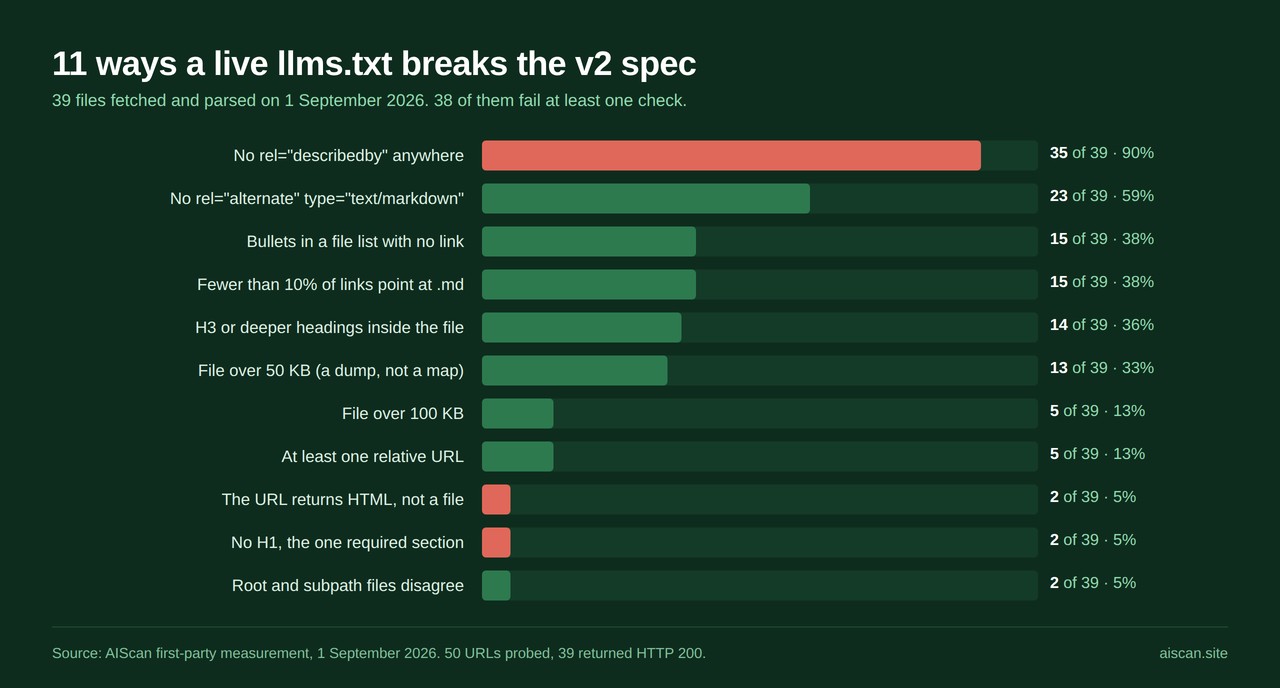
- The 11 mistakes, and how often each one appears
- The four that make the file unreadable
- The four that make it unusable
- The three discovery mistakes v2 was written to fix
- Check yours in one command
- Fix it on your stack
- Thresholds that tell you it is fixed
- Where AIScan fits, and where it doesn't
- What this research does not show
- Keeping it valid
- Run the scan on your own file
Verified 1 September 2026. Every figure here comes from a live fetch on that date.
We fetched /llms.txt from 50 well-known sites, kept the 39 that returned a real file, and ran every one against the llms.txt v2 specification. Thirty-eight of the 39 break the spec in at least one measurable way. Two are not text files at all: they return a quarter of a megabyte or more of HTML, while the sites serving them advertise the URL as text/plain in their own headers.
That is the gap this page closes. A dozen llms.txt generators rank for the query, and almost nothing tells you whether the file you already published is correct. The checks that exist mostly stop at "the URL returned 200". A 200 proves the server answered. It does not prove there is a file behind it.
Quick summary
| Question | Answer |
|---|---|
| What does the spec require? | One thing: an H1 with the site name. The spec calls it "the only required section" |
| How many real files are fully spec-clean? | 1 of 39 measured on 1 September 2026 |
| Most common single defect | No rel="describedby" link relation: 35 of 39 sites, the feature v2 was written to add |
| Most damaging single defect | The URL returns HTML rather than a file: 2 of 39, both over 250 KB |
| Does a 200 mean the file exists? | No. One site returns 200 and identical HTML for every path we tried, including a nonsense one |
| Are dead links inside llms.txt a real problem? | Barely. 143 sampled, 2 non-200, one of those ours |
| Fastest way to check yours | npx aiscan-cli yoursite.com, or paste the URL at aiscan.site: C2, C1, D3 and E1 in one pass |
| Free generator | aiscan.site/llms-txt-generator writes a spec-shaped file, but does not yet validate one |
What counts as valid, according to the spec itself
The proposal lives at llmstxt.org, authored by Jeremy Howard, first published 3 September 2024 and modified 10 August 2026. No standards body sits behind it, and there is no schema and no conformance suite. There is a prose format description, short enough to quote in full.
A conforming file contains these sections, as Markdown, in order:
- An optional byte-order mark
- An H1 with the name of the project or site. In the spec's own words, "This is the only required section"
- A blockquote with a short summary
- Zero or more Markdown sections of any type except headings, holding more detail
- Zero or more sections delimited by H2 headers, each containing a "file list"
Each file list entry is "a required markdown hyperlink [name](url), then optionally a : and notes about the file."
Two consequences fall out of that and both get missed. Headings below H2 are not part of the format, so a parser splitting on ^## silently reattaches everything under an ### to the wrong section. And a bullet without a link is not a file list entry, so a parser extracting [name](url) pairs drops it without complaining.
What v2 changed, and why it matters to your file
| Date | Change | What it means for a file written before it |
|---|---|---|
| 3 Sep 2024 | v1 published | Root-or-subpath file, H1 required, page.html.md the one Markdown URL form |
| 15 Jun 2026 | Google states it ignores llms.txt | Publishing one will "neither harm nor help" rankings, according to Google's AI optimization guide |
| 10 Aug 2026 | v2 published | rel="describedby" and rel="alternate" type="text/markdown" added; page.md allowed alongside page.html.md; subpath scoping defined |
| 10 Aug 2026 | llms_txt2ctx removed from the proposal | The file is no longer meant to be expanded into one context blob. Agents "view or search" it and follow links |
| 10 Aug 2026 | The "Optional" section loses its mechanical meaning | Still a convention, but it no longer tells tooling to skip anything |
The removal of context expansion has the sharpest edge. Under v1 a very large llms.txt was inelegant. Under v2 it is the pattern the spec stopped endorsing, because the file "stays small enough to fit in context" while "the detail lives behind the links".
How we measured this
Fifty candidate URLs, taken from the adopters named in Rankability's adoption tracker plus the documentation sites coding agents actually fetch. According to that tracker, updated 23 August 2026 on June 2026 data, only 8.7% of the Tranco top 1,000 publish an llms.txt at all, so this sample comes from a small and unusually diligent population. Each URL was requested once with a browser user agent, following redirects. Thirty-nine returned 200, nine returned 404, one looped on a 302, one timed out.
Each response was parsed with a script that checks the ordering rules, counts headings by level, extracts every bullet in every H2 section, classifies link targets and records the content type. Every homepage was fetched separately to look for the two v2 link relations, as an HTTP Link: header and as an HTML <link> element. A random sample of four links per file, 143 in total, was fetched to check for rot.
The corpus holds 11,240 links. Median file size is 28 KB, mean 73 KB, largest 508 KB.
The sample is not the web. It is the top of the adoption curve: documentation sites, developer platforms and AI companies, the population most likely to have read the spec. Whatever the error rate is here, it is worse elsewhere.
The 11 mistakes, and how often each one appears
| # | Mistake | Files affected | Consequence for an agent |
|---|---|---|---|
| 1 | The URL returns HTML, not a file | 2 of 39 | Agent reads a web page and cannot tell |
| 2 | No H1, the one required section | 2 of 39 | Fails the only hard requirement |
| 3 | Links relative, not absolute | 5 of 39 | Every link breaks once the file is copied |
| 4 | Links point at HTML, not Markdown | 15 of 39 | Lands back in the problem llms.txt was written to solve |
| 5 | Content dump, not a map | 13 over 50 KB, 5 over 100 KB | Burns the context budget it was meant to protect |
| 6 | H3 or deeper headings in the file | 14 of 39 | Section-splitting parsers misattribute every entry beneath |
| 7 | Bullets in a file list with no link | 15 of 39 | Silently dropped by a conforming extractor |
| 8 | Root and subpath files disagree | 2 confirmed | Two answers, depending which URL was asked |
| 9 | No rel="describedby" anywhere | 35 of 39 | The agent has to guess the file exists |
| 10 | No rel="alternate" type="text/markdown" | 23 of 39 | No route from a page to its Markdown twin |
| 11 | Checking the wrong path, believing the result | endemic, ours included | A confident wrong answer, worse than none |
The four that make the file unreadable
Mistake 1: the URL returns HTML. docs.cursor.com/llms.txt returns HTTP 200 with content-type: text/html; charset=utf-8 and 511,385 bytes of the documentation site's own page markup. docs.llamaindex.ai/llms.txt does the same at 264,964 bytes. Neither is a file, and both look like one to anything checking status codes.
Cursor's case is the sharpest in the sample, because the site does the modern thing correctly and the modern thing points at nothing. Its homepage sends this header, fetched from docs.cursor.com on 1 September 2026:
link: </llms.txt>; rel="describedby"; type="text/plain"; title="llms.txt"
That is textbook v2 discovery, declaring a text/plain file at /llms.txt. The URL serves half a megabyte of HTML. And the reason nobody noticed is mistake 11 in miniature: we requested docs.cursor.com/aiscan-nonexistent-probe-xyz and got HTTP 200 with byte-identical HTML. The site cannot return a 404, so every path on it "exists", and a file that was never deployed is indistinguishable from one that was.
Mistake 2: no H1. The same two files, for the same reason. The cleanest instance sits elsewhere. www.twilio.com/llms.txt returns 200, text/markdown, and 2,327,367 bytes. Verified on 1 September 2026, it contains zero # lines. Its first line is an H2 wrapped around bracket text that is not even a link. A 2.3 MB file missing the one section the spec calls required.
Mistake 3: relative URLs. Five files carry at least one; one carries nothing else. All 1,745 links in www.twilio.com/docs/llms.txt are relative, in the form * [Authy: 2FA and Passwordless Login](/docs/authy.md). In a browser that resolves fine. But the contents get lifted out of the browser into a model's context, where /docs/authy.md resolves against nothing. Mintlify's own file carries 29, Perplexity's five, Pinecone's three.
Mistake 4: the links point at HTML. Fifteen of 39 files send fewer than one link in ten to a Markdown target. stripe.com/llms.txt is 65,026 bytes and 285 links, of which 8% end in .md; the rest point at ordinary marketing and documentation pages. v2 is explicit that "the links in an llms.txt file should therefore point to LLM-friendly content". A curated map to a pile of HTML is a slower route to the same wall. Our own file is worse than Stripe's here: 1% of the links in aiscan.site/llms.txt point at Markdown.
The four that make it unusable
Mistake 5: the file is the content. Thirteen files exceed 50 KB, five exceed 100 KB, and clerk.com/docs/llms.txt reaches 520,440 bytes across 2,490 links. Under v1 that was defensible, because the expansion tool existed to consume it. v2 deleted the tool: the file stays small, the detail lives behind the links. A 500 KB map is not a map.
Mistake 6: H3 headings. Fourteen files use them, led by docs.expo.dev with 54, docs.replit.com with 53 and docs.digitalocean.com with 43. Clerk groups with ### Next.js, ### React, ### JavaScript. It reads well to a human. To the "classical programming techniques such as parsers and regex" the spec designs for, everything after ### Next.js still belongs to whatever H2 came last.
Mistake 7: bullets that are not entries. Fifteen files put non-link bullets inside H2 sections. ElevenLabs has 544 across 1,303 bullets, notes such as "For clean Markdown of any page, append .md to the page URL". The advice is good and the placement loses it, because a file-list extractor keeps [name](url) pairs and discards the rest. That belongs in the pre-heading detail block the spec provides for it.
Mistake 8: two files, two answers. clerk.com/llms.txt is 19,574 bytes; clerk.com/docs/llms.txt is 520,440. www.twilio.com/llms.txt is 2.3 MB; www.twilio.com/docs/llms.txt is 376,298. v2 defines the tie-break, "where more than one file applies, agents should use the most specific one", but nothing in either file says the other exists, and most tooling only asks the root.
The three discovery mistakes v2 was written to fix
Mistake 9: nobody publishes rel="describedby". The headline number, and it is bleak. Four of the 39 sites advertise their llms.txt through the relation v2 added for the purpose: aiscan.site, docs.cursor.com and zapier.com with an HTTP Link: header, storeseo.com with an HTML <link> tag. The other 35 publish a file and leave every agent to guess at the conventional path.
Mistake 10: no Markdown alternate. Sixteen of 39 emit rel="alternate" type="text/markdown", and it is the relation that rescues sites whose Markdown URLs follow neither spec form. wordpress.org serves its Markdown at ?output_format=md, a query parameter rather than a .md suffix, and says so in a <link> tag with an aside attached: "Hey agent! You are burning tokens scraping HTML like it is 2005. Use this instead." A client looking only for .md suffixes never finds that file. The link relation is the only thing that does.
Mistake 11: checking one path and trusting the answer. Our automated pass flagged nextjs.org for referencing llms-full.txt while nextjs.org/llms-full.txt returns 404. We checked by hand. Next.js is right and our script was wrong: its file points at https://nextjs.org/docs/llms-full.txt, which returns 200. Our checker probed the root because that is where these files usually live, and produced a confident false positive on one of the best-maintained files in the sample. The next section says where else we do this.
Check yours in one command
Start with the scan. It answers the whole question in one request rather than eleven.
npx aiscan-cli yoursite.com
Or paste the URL at aiscan.site. Free, no account. The checks that matter here are C2 (llms.txt present and structured), C1 (Markdown content negotiation), D3 (link relations for discovery) and E1 (a hard 404 on an unknown path, which is what makes every other result trustworthy). The content dimension page explains C1 and C2; the discoverability page covers D3 and E1.
If you would rather check by hand, four commands cover the same ground:
# 1. Is it a file, and what type? Want text/plain or text/markdown, never text/html
curl -sI https://yoursite.com/llms.txt | grep -i 'content-type\|^HTTP'

# 2. Does an invented path also return 200? If so, result 1 proves nothing
curl -so /dev/null -w '%{http_code}\n' https://yoursite.com/definitely-not-a-real-path

# 3. Starts with an H1? Uses headings deeper than H2?
curl -s https://yoursite.com/llms.txt | head -1
curl -s https://yoursite.com/llms.txt | grep -c '^### '

# 4. Do you advertise it? Look for rel=describedby
curl -sI https://yoursite.com/ | grep -i '^link:'
Run command 2 first if you run only one. A site returning 200 for everything makes every other check meaningless.
Fix it on your stack
The branch you are on is usually obvious from one question: does something else already write your robots.txt?
WordPress. ThinkRank is the one to reach for first, for a specific reason: it writes robots.txt, robots meta, schema, sitemaps and llms.txt from a single plugin, which is the answer to the situation most WordPress sites are in, where two or three SEO plugins quietly overwrite each other's robots.txt. It migrates settings from Rank Math, Yoast, All in One SEO and SEOPress, so switching re-enters nothing. Honest alternatives: Yoast and Rank Math are both stronger on editorial workflow and on-page analysis, and if llms.txt is the only gap you have, a static file at the web root works and costs nothing. Our WordPress setup guide walks the manual path, and /docs/platforms/wordpress collects the rest.
Shopify. StoreSEO is the default here for a structural reason: Shopify will not let you write an arbitrary file to the store root, so llms.txt has to come through the platform, and StoreSEO builds it from your products, collections, pages and articles rather than asking you to hand-maintain it. It also handles agents.md and store schema. Alternative worth naming: with a small static catalogue, the template route in our Shopify llms.txt guide is free and adequate. Platform notes are at /docs/platforms/shopify.
A documentation platform. Mintlify, Docusaurus and Starlight generate the file for you, which is why the generated files here cluster around the same defects. Check the output, particularly for H3 headings and relative URLs.
Hand-rolled, or a framework. The free generator produces the correct shape in about a minute, and our Next.js llms.txt guide shows the App Router route-handler version. Then add the two link relations, a header rule in your CDN that needs no page edits:
Link: </llms.txt>; rel="describedby"; type="text/plain",
      </index.md>; rel="alternate"; type="text/markdown"
Whichever branch you take, two things carry most of the value: a path an agent will actually try, and links that point at Markdown.
Thresholds that tell you it is fixed
After you deploy, these are the thresholds:
| Signal | Pass | Fail |
|---|---|---|
Content type on /llms.txt | text/plain or text/markdown | anything with text/html |
| Status on an invented path | 404 | 200; stop here until it is 404 |
| First non-blank line | starts with # | anything else |
grep -c '^### ' | 0 | 1 or more |
Bullets in H2 sections without [name](url) | 0 | 1 or more |
| File size | under 25 KB comfortable, under 50 KB defensible | over 100 KB |
Share of links ending .md | above 80% | under 10% |
Link: header on the homepage | contains rel="describedby" | absent |
| AIScan C2 | pass | partial or fail |
If C2 comes back partial rather than fail, the usual cause is a file that parses but has no H1 or no sections; the evidence string names which. If C2 says fail with HTTP 404 and the file is definitely live, read the next section, because the bug may be ours.
Where AIScan fits, and where it doesn't
Everything above is checkable without us, and this page is written so you can finish with curl alone. Two limits below are defects in our own scanner that this research surfaced.
| What AIScan does | What it does not do |
|---|---|
| C2 confirms the file exists, has an H1, sections and links | Does not count H3 headings, non-link bullets or relative URLs |
| C1 tests Markdown content negotiation | Currently passes a .md URL returning text/html, a real bug |
D3 reads Link: headers and <link> relations | Does not check the rel="describedby" target is a valid file |
| E1 proves a hard 404 on unknown paths | Not yet chained into C2, so a soft-404 site can pass C2 on nothing |
C2 probes /llms.txt at the origin root | Does not probe subpath files, which v2 explicitly allows |
That last row cost us an embarrassment worth publishing. Scanning https://fastht.ml/docs on 1 September 2026 returned C2 fail, evidence "HTTP 404". But fastht.ml/docs/llms.txt returns 200 with a valid 4,796-byte file, and that file is the reference implementation llmstxt.org links to as its own worked example. Our scanner called the spec author's canonical file missing, because it asked the root and stopped.
This is the third time the same shape of bug has surfaced in our own product. P3 missed Stripe's Agent Skills index by probing one path. C1 passes a Markdown URL returning HTML because it reads a status code and ignores the content type it wrote down. Now C2 misses subpath files. All three are on the backlog and named in our Cloudflare and Lighthouse comparison, where the C1 case was first published.
Our own file is not clean either. aiscan.site/llms.txt links to https://aiscan.site/api/public/scan, which returns HTTP 400 with {"error":"Missing or invalid 'url' parameter"}. A real endpoint that needs a parameter, which is exactly the kind of link a human eye skips and an agent follows.
What this research does not show
Link rot inside llms.txt is not a real problem yet. Of 143 sampled links, 141 returned 200. One failure was a transient timeout that succeeded on retry. The other was ours. Anyone worrying about link freshness here is solving a problem that has not arrived.
Markdown targets are honest when they exist. All 80 sampled .md links returned text/markdown. The soft-serving problem in mistake 1 lives at /llms.txt itself, not in the Markdown pages behind it.
One limit on all of it: whether any of this changes how often a model cites you is unmeasured. Google ignores llms.txt entirely, and our evidence review of whether llms.txt works covers what the data supports. Fix validity because an invalid file is definitely useless, not because a valid one is definitely read.
Keeping it valid
Ten minutes a quarter, or the day your documentation structure changes.
-
/llms.txtreturnstext/plainortext/markdown, nevertext/html - An invented path on the same host returns 404
- First non-blank line is
# Your Site Name - No
###headings anywhere in the file - Every bullet under an H2 is
- [name](url): notes - Every URL is absolute
- Links point at
.mdtargets wherever those exist - File is under 50 KB
- Homepage sends
rel="describedby"andrel="alternate" type="text/markdown" - If you publish a subpath file, the root file mentions it
- Every link returns 200 without a required query parameter
The last one is on our list too.
Run the scan on your own file
Run npx aiscan-cli yoursite.com, or paste your URL at aiscan.site. Read C2 first for the file itself, then C1 for Markdown negotiation, D3 for the link relations, and E1 to confirm the 404 behaviour that makes the other three trustworthy. Then work the checklist above against your file. Most of these 39 sites are two changes from clean: absolute URLs, and a Link: header. Neither needs a rewrite.
More platform walkthroughs live at aiscan.site/guides.
Frequently asked questions
My AIScan report says C2 failed with HTTP 404, but my llms.txt is definitely live. What is wrong?
Check where the file sits. AIScan's C2 currently probes /llms.txt at the origin root only, and llms.txt v2 explicitly allows a file at any subpath, where it covers the pages beneath it. If your only file is at /docs/llms.txt, C2 reports a 404 even though the file is fine. We confirmed this on 1 September 2026 against fastht.ml/docs, the reference implementation llmstxt.org links to as its own example: C2 returned fail with evidence HTTP 404, while fastht.ml/docs/llms.txt returned 200 with a valid 4,796-byte file. The fix belongs in our scanner and is on the backlog. Until it lands, publish a root file as well as any subpath file, which is good practice regardless because most tooling only asks the root.
My llms.txt returns HTTP 200 but agents behave as though it is not there. What should I check first?
Check whether your site returns 200 for paths that do not exist. Request something invented, such as https://yoursite.com/definitely-not-a-real-path, and look at the status code. If that returns 200, then so does every other URL on the host, and the 200 on /llms.txt tells you nothing. This is live today on docs.cursor.com: a nonsense path returned HTTP 200 with byte-identical HTML to /llms.txt on 1 September 2026, 511,385 bytes of the documentation site's own page markup. After the status code, check the content type. It must be text/plain or text/markdown. Anything containing text/html means the URL is serving a web page, not a file.
A validator says my file has no H1, but it starts with a heading. Why?
Two common causes. The first is that the heading is an H2 rather than an H1: the spec requires a single hash, and a file that opens with ## fails the only hard requirement in the format. www.twilio.com/llms.txt is a live example, 2,327,367 bytes with zero lines beginning with a single hash, verified on 1 September 2026. The second cause is that the URL is not returning your file at all, so the validator is parsing HTML. Run curl -sI on the URL and read the content type before debugging the Markdown.
Does llms.txt have to be at the root of the site?
No. Version 2 of the proposal, published 10 August 2026, defines subpath scoping directly: a file covers the URLs under its path, and where more than one file applies, agents should use the most specific one. That is what lets a project that controls only a directory, such as a GitHub Pages project site, publish one. In practice, publish a root file anyway. Most scanners and most agents try the conventional root path first, and two files that disagree cause their own problem. clerk.com serves 19,574 bytes at the root and 520,440 bytes at /docs/, and neither file mentions the other.
How big should an llms.txt file be?
Small enough to sit in a context window alongside the rest of an agent's work. The v2 spec is explicit that the file stays small enough to fit in context and the detail lives behind the links. Under 25 KB is comfortable and under 50 KB is defensible. Across our 39-file sample the median was 28 KB, but 13 files exceeded 50 KB and clerk.com/docs/llms.txt reached 520,440 bytes across 2,490 links. The reason this matters more than it used to is that v2 removed the llms_txt2ctx context-expansion tool from the proposal entirely, so nothing is meant to consume a large file wholesale any more.
Are relative URLs allowed in llms.txt?
The format description asks for a markdown hyperlink and does not spell out absolute versus relative, but relative URLs defeat the purpose. An llms.txt exists so its contents can be lifted out of the browser and into a model's context, and a link such as /docs/authy.md resolves against nothing once it is there. It is not a hypothetical: all 1,745 links in www.twilio.com/docs/llms.txt are relative, measured 1 September 2026. Use absolute URLs, and point them at Markdown targets rather than HTML pages wherever a Markdown version exists.
Do I really need rel="describedby" and rel="alternate" type="text/markdown"?
They are what version 2 was written to add, and almost nobody has them. Of 39 sites we measured on 1 September 2026, four advertise their llms.txt with rel="describedby" in any form, and 16 emit rel="alternate" type="text/markdown". Both can be delivered as an HTTP Link: response header set in your CDN, which needs no page edits and also works for non-HTML resources. They matter most when your Markdown URLs do not follow either spec form: wordpress.org serves Markdown at ?output_format=md, a query parameter rather than a .md suffix, so a client looking only for .md suffixes never finds it and the link relation is the only route.
Will fixing my llms.txt improve my Google rankings?
No, and anyone promising otherwise is selling something. Google's AI search optimization guide states that creating these files will neither harm nor help your site's visibility or rankings in Google Search, because Google Search ignores them. The case for a valid llms.txt is narrower and more honest: coding agents and directed retrieval tools do fetch these files when a human points them at a URL, and an invalid file is definitely useless to them, while a valid one is at least readable. Fix it for that reason, and treat any ranking claim attached to it with suspicion.

About the author
M Asif Rahman
Entrepreneur, curious about AI
I have been building companies for a long time, and lately most of my curiosity goes to AI. AIScan is a small personal project I built on a flight from Dubai to Narita. I use it to understand how ready the web is for AI agents, and I share what the scans teach me.
Related guides
llms.txt vs robots.txt vs sitemap.xml in 2026: Six Files, Six Jobs
Verified 4 September 2026. Every figure below was measured or fetched on that date. Three files keep getting compared as if they were competing for the same job: robots.txt, sitemap.xml and llms.txt.…
Platform League Table: WordPress, Next.js, Astro and Shopify Across 728 Sites
Every few weeks someone asks which platform produces the most agentready sites. WordPress, Next.js, Astro and Shopify all have fans, and a ranked table is the answer people expect. We have the data…
agents.md: What It Is and How It Differs from llms.txt
Ask three people what agents.md is and you get three answers. One says it is the file coding agents read in a repository. One says it is the Markdown page a store publishes for shopping agents. One…