Table of contents
- Quick summary
- What actually changes on 15 September
- The policy timeline, dated
- Why one toggle catches Googlebot
- How to check whether your site is blocking anything
- Method 1: curl, the enforcement test
- Method 2: read your robots.txt
- Method 3: the Cloudflare dashboard
- Testing with a forged user-agent, and why that is legitimate here
- What to do, by site type
- Decide what your setting should be on 16 September
- If you find you were blocking Googlebot
- If your site runs on WordPress
- What fixing this does not fix
- Five ways people get the 15 September migration wrong
- The pre-15 September checklist
- Maintenance
- Where AIScan fits, and where it doesn't
- The honest summary
Update — 28 September 2026: the 15 September migration landed, and it did not go the way this article predicted. Cloudflare's own follow-up post, "Introducing an Accountable designation for AI crawlers", confirms that existing zones with Training already set to Block or Block on pages with ads were migrated automatically to the new Disallow AI Training setting, which keeps Googlebot, Applebot and Bingbot serving search while still declaring the no-training preference in robots.txt. Apple, Google and Microsoft were also given a new Accountable designation, one of whose qualifying conditions is an explicit "assurance that opting out of AI training will not affect traditional search results." The scenario this article warned about — an old, forgotten Training:Block toggle silently 403-ing Googlebot on the 15th — did not happen to accounts that took no action. Googlebot, Applebot and Bingbot now lose access only when a site owner explicitly selects the plain Block setting going forward; that is a deliberate choice, not a leftover one. The curl test below still tells you what your site is doing today, and the row-by-row table further down is kept for the record, but treat its "from 15 Sep: 403" cells as the risk that was avoided, not the outcome that occurred, for anyone who had not already switched away from Disallow.**
Updated 25 August 2026. On 15 September, Cloudflare changes how it enforces AI crawler rules. If you have ever ticked "Block AI bots" on a Cloudflare zone and left it on, Googlebot and Bingbot start receiving HTTP 403 responses from your site on that date. Checking takes about sixty seconds with curl, and fixing it is one setting. This guide covers both, plus the three categories Cloudflare now sorts crawlers into, because that taxonomy is what decides which bots reach you.
The headline you have probably seen, "Cloudflare blocks AI crawlers by default on September 15", is wrong on two counts, and one of them matters a great deal. Cloudflare softened the default on 21 August. The part that survived is the part almost nobody is writing about, and it puts organic search traffic at risk rather than AI traffic.
Quick summary
Short version: Cloudflare is not blocking AI crawlers by default on 15 September. The change that will actually cost you traffic is that mixed-purpose crawlers stop being exempt, so an old "Block AI bots" toggle starts returning 403 to Googlebot.
| If this is you | Do this before 15 September | Why |
|---|---|---|
| You ticked "Block AI bots" in 2025 and forgot | Turn it off, or set Training to Disallow instead of Block | From 15 Sep it returns 403 to Googlebot, Applebot and Bingbot |
| You depend on Google organic | Run the curl test below on a real content URL | A 403 on the Googlebot line means you are being deindexed |
| You worried this kills your ChatGPT citations | Nothing | Search was never blocked. OAI-SearchBot and PerplexityBot are Search crawlers |
| You are an ad-funded publisher | Allow Search, set Training to Disallow, decide Agent deliberately | Disallow states the preference without 403-ing search engines |
| You run e-commerce or SaaS | Allow all three categories | Blocking Agent breaks agentic shopping |
| You are on WordPress | Check whether a plugin manages your robots.txt too | Two systems writing robots.txt is the most common cause of "I changed it and nothing happened" |
The 60-second test: curl -sI -A "Mozilla/5.0 (compatible; Googlebot/2.1; +http://www.google.com/bot.html)" https://yoursite.com/ | head -1. A 200 means you are fine. A 403 means fix it today, and so does a 402 or a challenge page — AI Crawl Control can be set to return either code, and a crawler treats a challenge as a refusal.
What actually changes on 15 September
Two separate things, and they apply to different people.
Change one: new defaults for new domains. In the 1 July 2026 announcement, Cloudflare said that for domains newly onboarding to Cloudflare, the Training and Agent categories would be blocked by default on pages that display ads, while Search stayed allowed. Then on 21 August Cloudflare revised it: new non-publisher customers now get no blocks at all by default, and publishers self-select at onboarding by ticking "I monetize from pages with ads on this domain," which sets Training to Disallow rather than Block. Cloudflare's own words: "new customers will not have any blocks or disallows added by default when they onboard a domain: the choice is up to the customer."
If you are an existing Cloudflare customer, none of that touches you.
Change two: mixed-purpose crawlers get judged on all their behaviours. This one does touch existing zones, and it is the reason this article exists. From the July announcement:
"multi-purpose crawlers such as Googlebot, Applebot, and BingBot will be blocked by customers who have selected to block Training (either through the new options to manage AI traffic, or through the legacy Block AI bots service)."
Cloudflare classifies Googlebot as both a Search crawler and a Training crawler, because Google uses the same fetch for both. Until now the legacy "Block AI bots" toggle carved out an exception for mixed-purpose bots. On 15 September that exception ends, and the most restrictive matching rule wins. Block Training, and you block Googlebot with it.
This is not hypothetical. Search Engine Journal reported on 4 August that site owners were already seeing it, quoting one: "When I set AI Training = Block, both Googlebot and Bingbot start receiving HTTP 403 responses." Google's John Mueller asked for details to investigate.
Cloudflare sits in front of roughly a fifth of the web, so the population of sites with a forgotten toggle from the 2025 "Content Independence Day" push is not small.
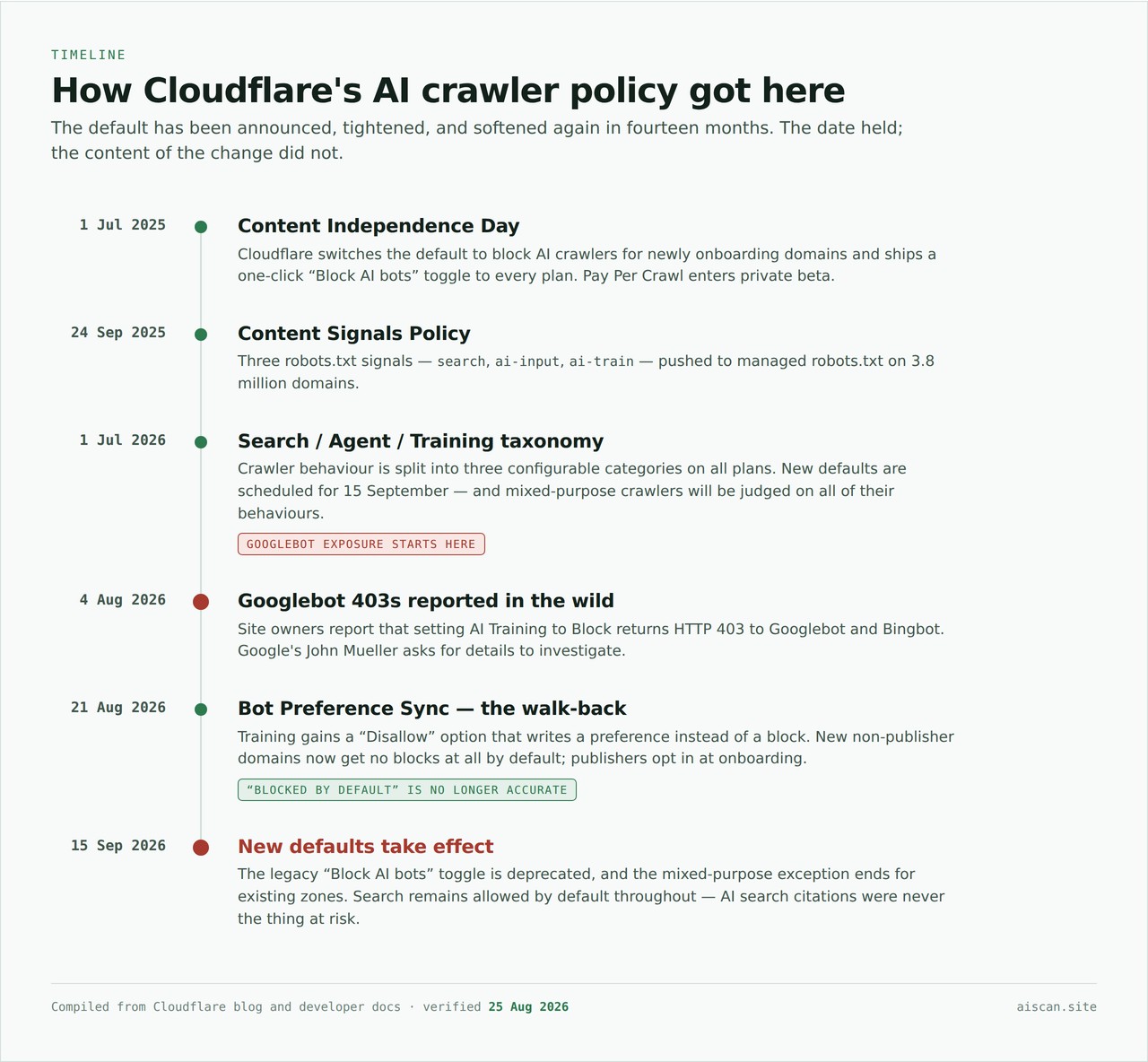
The date held. The content of the change did not.
The policy timeline, dated
Four dates explain how a change nobody opted into ends up returning 403 to Googlebot.
| Date | What happened | Why it matters on 15 September |
|---|---|---|
| 1 July 2026 | Cloudflare replaced its old "AI bots" grouping with a behaviour taxonomy of eleven crawler types, three of them configurable: Search, Agent, Training | Googlebot picked up a Training tag on this date. It had never carried one before. |
| 1 July – 14 September 2026 | Legacy "Block AI bots" keeps an exemption for mixed-purpose crawlers | This exemption is the only reason your site is not already returning 403 to Googlebot |
| 21 August 2026 | Cloudflare announced Bot Preference Sync, generating robots.txt from your Search/Agent/Training configuration | Confirms the two layers currently disagree on most zones, and that Cloudflare knows it |
| 15 September 2026 | The exemption ends. The most restrictive matching rule applies to every crawler | A zone with Training set to Block starts refusing Googlebot |
The thing to hold on to is that nothing about your configuration changes on the 15th. Your settings on the 16th are the settings you have today. What changes is how Cloudflare resolves a crawler that matches two rules at once, and Googlebot is now such a crawler.
That is why this is not a story about Cloudflare blocking AI crawlers. It is a story about an exemption expiring underneath a toggle somebody ticked during a news cycle last year and has not looked at since.
Why one toggle catches Googlebot
Think of it as a bouncer with three lists rather than a sign on the door. The sign asks politely. The bouncer checks every arrival against every list, and if the visitor appears on any list marked "blocked," they do not get in. Googlebot carries two badges, Search and Training. Blocking one badge is enough.
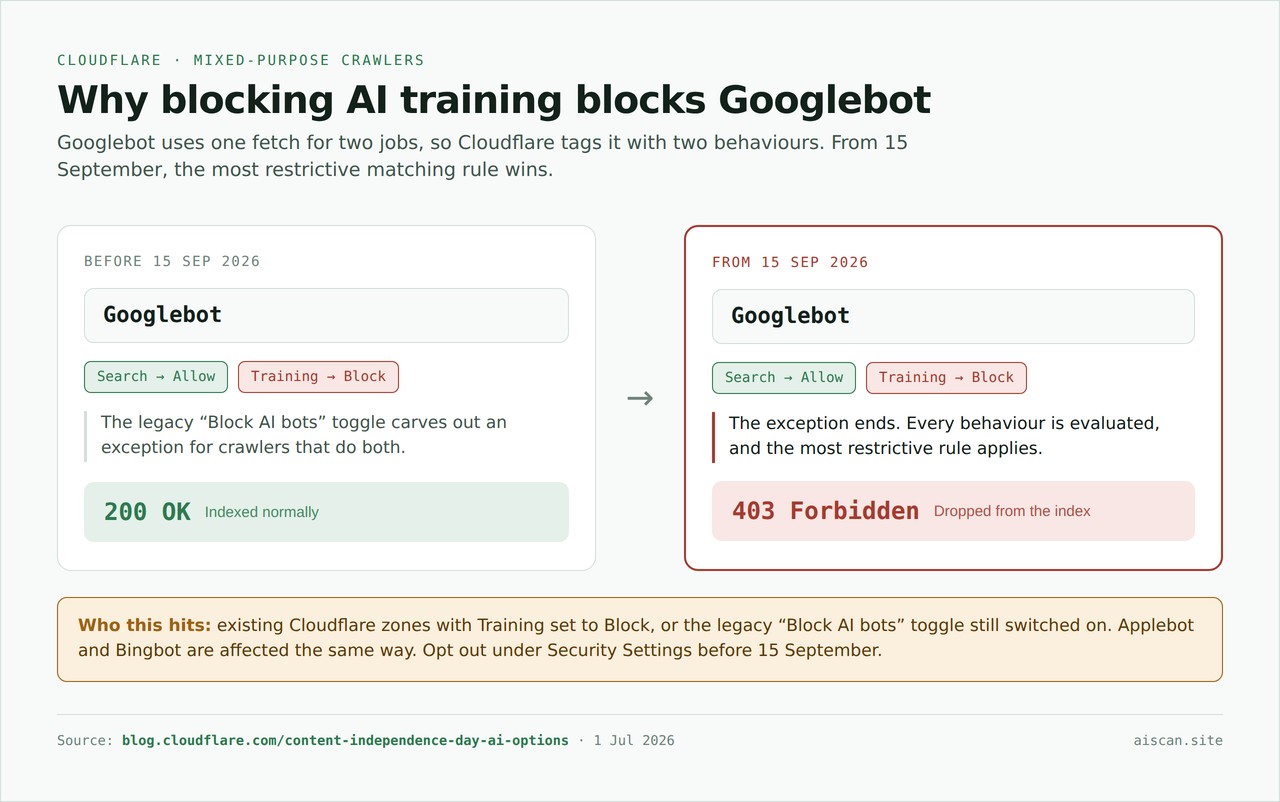
Googlebot carries two behaviour tags. From 15 September, the most restrictive matching rule wins.
Enforcement happens at the Cloudflare edge through WAF rules, not in robots.txt. That distinction decides everything downstream: robots.txt is a message, the edge is a door, and only one of them can return a 403.
Here is the same configuration read twice, before and after the date:
| Your Cloudflare setting | Googlebot before 15 Sep | Googlebot from 15 Sep | Your AI search citations |
|---|---|---|---|
| Training Allow, Search Allow | 200 | 200 | Unaffected |
| Training Block, Search Allow | 200 (exempted as mixed-purpose) | 403 only if you kept Block — existing Block configs were auto-migrated to Disallow AI Training on 15 Sep, which stays 200 | Unaffected either way |
| Training Disallow (robots.txt only), Search Allow | 200 | 200 | Unaffected |
| Search Block | 403 | 403 | Gone, and so are your rankings |
| Legacy "Block AI bots" toggle, untouched since 2025 | 200 | 200 — auto-migrated to Disallow AI Training on 15 Sep, per Cloudflare's follow-up post | Unaffected |
Row two and row five are the same failure, arrived at from two directions. Row three is the configuration most people who reached for Block actually wanted: Disallow writes the preference into robots.txt and leaves indexing alone; Block drops a 403 at the edge on everything carrying the tag.
Which crawlers sit in each of the three categories, and what each one costs you to block, is a longer answer than this article needs. It is the whole subject of Search, Agent, Training: what each Cloudflare category actually controls. Read that one if you are deciding what your categories should be rather than checking what they currently do.
How to check whether your site is blocking anything
Three methods, easiest first. Do at least the first two. They answer different questions.
Method 1: curl, the enforcement test
This is the test that matters, because it measures what actually happens rather than what you intended. Run it against a real content URL, not just your homepage, and include one page that carries ads if you have any.
# Baseline: should be 200
curl -sI -A "Mozilla/5.0" https://example.com/ | head -1

# Search engines: check these before 15 September
curl -sI -A "Mozilla/5.0 (compatible; Googlebot/2.1; +http://www.google.com/bot.html)" https://example.com/ | head -1
curl -sI -A "Mozilla/5.0 (compatible; bingbot/2.0; +http://www.bing.com/bingbot.htm)" https://example.com/ | head -1

# Retrieval crawlers: these feed your AI search citations
curl -sI -A "Mozilla/5.0 AppleWebKit/537.36 (KHTML, like Gecko); compatible; OAI-SearchBot/1.0; +https://openai.com/searchbot" https://example.com/ | head -1
curl -sI -A "Mozilla/5.0 (compatible; PerplexityBot/1.0; +https://perplexity.ai/perplexitybot)" https://example.com/ | head -1

# Live agents: a person is waiting on these
curl -sI -A "Mozilla/5.0 AppleWebKit/537.36 (KHTML, like Gecko); compatible; ChatGPT-User/1.0; +https://openai.com/bot" https://example.com/ | head -1
curl -sI -A "Mozilla/5.0 (compatible; Claude-User/1.0; +Claude-User@anthropic.com)" https://example.com/ | head -1

# Training crawlers
curl -sI -A "Mozilla/5.0 AppleWebKit/537.36 (KHTML, like Gecko); compatible; GPTBot/1.1; +https://openai.com/gptbot" https://example.com/ | head -1
curl -sI -A "Mozilla/5.0 (compatible; ClaudeBot/1.0; +claudebot@anthropic.com)" https://example.com/ | head -1
Reading the results:
HTTP/2 200: allowedHTTP/2 403: blocked at the edgeHTTP/2 402: pay-per-crawl is set on this zone
Cloudflare's block fires on the user-agent string alone, so a plain curl with a spoofed header gets treated exactly like the real crawler. Running this against Cloudflare's own test zone crawltest.com on 25 August 2026 returned 403 for GPTBot and ClaudeBot, and 200 for a plain browser string, which is what a correctly configured training block looks like.
A 403 on the Googlebot line is the finding this article is about. Fix it today, not on 14 September.
Method 2: read your robots.txt
curl -s https://example.com/robots.txt | grep -iE "Content-Signal|BEGIN Cloudflare|GPTBot|ClaudeBot"
Look for a block that Cloudflare injected, marked # BEGIN Cloudflare Managed content or, since late August, # BEGIN Cloudflare Bot Preference Sync, and a line resembling:
Content-Signal: search=yes,ai-train=no,use=reference
That use= field is new as of July 2026. It has three values: immediate (interact but store nothing), reference (index, excerpt, link back, and the default), and full (summarize and reproduce).
Treat this method as informational only. robots.txt records a preference; it does not prove enforcement. Cloudflare says so plainly: the values "signal a website owner's preference, rather than issuing blocks directly." A clean robots.txt tells you nothing about whether you are returning 403s at the edge. That is why Method 1 comes first.
Worth knowing before you rely on Content Signals: Google's John Mueller said in July that "none of the crawlers / llms use the 'content-signal' robots.txt directives. It was made up by a CDN, afaik it has no effects whatsoever for any crawler or llm."
Method 3: the Cloudflare dashboard
Exact paths, current as of August 2026:
- Security Settings > Configure AI bot policies: the Search / Agent / Training controls. Each has three options: Block (on all pages), Block on pages with ads, and Allow (do not block).
- Security Settings > Block AI bots: the legacy toggle, marked "[Deprecating on September 15, 2026]". If this is on, you are in the affected group.
- AI Crawl Control: per-crawler control and metrics. The Metrics tab has a status-code distribution chart and a CSV export, which is the fastest way to see whether you have been returning 403s to search engines already.
- Security Analytics: filter by blocked bot traffic.
One thing to know about AI Crawl Control: blocking a crawler there "creates or updates a WAF custom rule on your zone." It is not a soft preference. It also supports only two response codes, 403 and 402. Anything else and the block will not be enforced.
Testing with a forged user-agent, and why that is legitimate here
The curl test above works by claiming to be GPTBot. That is a forged user-agent string, and it is exactly the right instrument for this job: you are testing what your own edge does with a claim, and the whole point is that Cloudflare's rules act on the claim rather than on proof.
The same property is a problem in the other direction. If you are reading your access logs to decide who to allow, the string proves nothing. Anyone can send it, including the curl command in this article. Identity has to come from the source IP matched against the operator's published range, and even that fails for several of the most-impersonated crawlers.
That is a separate discipline with its own traps, and we tested every operator's published range and reverse-DNS behaviour live rather than repeating the standard advice. The results are in Every AI crawler user-agent in 2026: the verified list and how to spot a fake, including the three major crawlers where reverse DNS either does not work at all or produces a confident false pass.
For the purposes of the 15 September check, forge freely. You are interrogating your own server.
What to do, by site type
The right answer depends on how you make money, so pick your branch. To work out which one you are on, ask: does someone pay me because a person landed on this page?
Ad-funded publisher. Allow Search. Set Training to Disallow rather than Block. That is exactly what the 21 August change added, and Cloudflare's description is that "a 'no training' preference is written to your robots.txt, so that cooperating mixed-use crawlers who take the extra Transparency step can still access your content for search indexing." Decide Agent deliberately rather than by default; blocking it on ad pages protects ad impressions but costs you the reader who asked ChatGPT about your article.
E-commerce, SaaS, or lead generation. Allow all three. Cloudflare's own example makes the case: "an e-commerce store may want everything crawled and trained on, so its products surface when a shopper asks a chatbot for 'the best sofa for a small apartment.'" Blocking Agent here also breaks agentic shopping, which is the traffic source everyone is trying to win.
Anyone who depends on Google organic. Do not leave Training set to Block past 15 September without explicitly opting out of the mixed-use default. Cloudflare added an opt-out for this: "if a website owner wants to opt out of these new default configurations, they can easily mark this in their Security settings any time leading up to September 15, which will confirm that they want no changes on Training crawlers that also crawl for Search purposes."
High-value proprietary content with low SEO dependence. Block Training everywhere. Consider serving 402 instead of 403 through pay-per-crawl, which signals a possible commercial relationship rather than a flat refusal. It remains in private beta, with a minimum price of $0.001 per crawl, and requires the crawler to have a Cloudflare billing relationship and Web Bot Auth signing.
One caution that applies to every branch. Cloudflare's own documentation warns in the pay-per-crawl flow that setting search crawlers to Block or Charge "may negatively impact your site's SEO performance, as search engines may not be able to properly index your content." Take that literally.
Decide what your setting should be on 16 September
The check tells you what your site does today. This tells you what it should do. Start from the state you found, not from what you think you configured.
You found a 200 for every user-agent you tested. Nothing to do before the 15th. Put a re-test in your calendar for the 16th anyway, because a zone can inherit rules from an account-level policy you did not set.
You found a 403 for GPTBot but 200 for Googlebot. This is the state most people expect to be in, and today it is stable. On the 16th it is not: whatever produced that 403 is a Training-tagged block, and Googlebot carries a Training tag now. Decide which you actually want:
- You want to keep AI training out and keep Google. Move from Block to Disallow. You lose edge enforcement and keep a robots.txt preference, which is what the large training crawlers honour anyway.
- You want enforcement against training crawlers specifically. Keep Block, but scope the rule to named user-agents rather than to the Training behaviour tag. You are then blocking GPTBot and ClaudeBot by name and leaving mixed-purpose crawlers alone.
- You are a publisher monetising crawl access. Keep Block on Training and add an explicit Allow for Googlebot ahead of it. Rule order matters here; the allow has to be evaluated first.
You found a 403 for Googlebot today. Then this is not a 15 September problem, it is a live one, and the recovery section below applies now rather than in three weeks.
You found a challenge page rather than a 403 or a 200. A managed challenge is a block as far as a crawler is concerned, and nothing without a browser will solve it. Treat a 403 and a challenge identically for every decision on this page.
You cannot find any rule that explains what you are seeing. Check the account level, not just the zone. Check WAF custom rules and rate limiting as well as the bot settings, because a rule written for an unrelated reason can match on user-agent. And check whether the zone is behind a second proxy that Cloudflare does not control.
If you find you were blocking Googlebot
Fix the rule first, then work out what it cost you. In that order, because every day the 403 stands is another crawl that confirms the page is gone.
1. Confirm from Google's side, not just yours. In Search Console, open URL Inspection, paste an article URL and run Test live URL. That fetch comes from Google, through your edge, with Googlebot's real identity, which is the one test your own curl cannot reproduce. If the live test succeeds while your logs show 403s, the rule is already fixed and you are looking at stale data.
2. Read the Page indexing report. The status you are looking for is "Blocked due to access forbidden (403)", which is one of Google's documented page-indexing reasons (Search Console Help, checked 28 August 2026). A rising count in that bucket dated after 15 September is the signature of this exact problem. A count that was already there before the 15th points at something else: an origin rule, a login wall, a plugin.
3. Do not judge it by rankings for the first few days. Impressions in Search Console move before positions do, because a dropped page stops being eligible before the ranking system reflects it. Impressions are the earlier signal.
4. Request indexing for your most important URLs, then stop. URL Inspection's Request Indexing is rate-limited and is not a recovery tool at scale. Use it on a handful of pages to confirm the path is open, and let the sitemap do the rest.
5. Resubmit the sitemap. It costs nothing and it gives the crawler a fresh list with current lastmod values.
Google publishes no recovery timeline for this, and anyone who quotes you one is guessing. What is knowable is the sequence: the live URL test passes first, the 403 bucket in the Page indexing report stops growing next, and impressions return after that. Watch those three in order rather than watching your rankings and worrying.
If your pages were only ever eligible in Bing, none of the above applies and you would not have noticed the outage at all, which is its own argument for having Search Console connected before you need it.
If your site runs on WordPress
WordPress makes this harder to diagnose, because robots.txt is usually not a file. It is generated, and three systems can be generating parts of it at once: WordPress core's virtual robots.txt, your SEO plugin, and Cloudflare prepending its own managed block. That is the most common reason someone edits robots.txt, sees no change, and concludes the edit did not work.
Work out which layer you are actually looking at before you change anything:
curl -s https://yoursite.com/robots.txt
Read the output top to bottom and attribute it:
# BEGIN Cloudflare Managed contentor# BEGIN Cloudflare Bot Preference Syncat the top: Cloudflare is prepending. Everything above that marker'sENDcame from Cloudflare and cannot be edited in WordPress.- A
Sitemap:line pointing at/sitemap_index.xml: Yoast or Rank Math is generating the rest of the file. Edit it in the plugin. - A
Sitemap:line pointing at/wp-sitemap.xmland nothing else: you are on core's virtual robots.txt with no plugin involved. - Nothing recognisable from any of the three: you have a physical
robots.txtin the web root, which silently wins over everything WordPress would have generated.
None of that changes your 15 September exposure, because the edge decides and the file only declares. What it changes is where you go to fix the declaration once the edge is right, and getting that wrong costs an afternoon.
Once you know which layer owns the file, keep it coherent rather than fighting it from three places. ThinkRank consolidates the WordPress side (robots.txt, robots meta and llms.txt from one screen) and migrates existing directives from Rank Math, Yoast, All in One SEO and SEOPress so you are not retyping them. AIScan detects it during a scan and adapts its fix steps accordingly. The full WordPress walkthrough, including the sitemap and feed halves, is in The complete AI readiness setup for WordPress, and the platform reference is at /docs/platforms/wordpress.
What no plugin can do is change Cloudflare's edge behaviour. If Cloudflare is returning 403 to Googlebot, that is fixed in the Cloudflare dashboard and nowhere else.
What fixing this does not fix
Three things a corrected Cloudflare rule will not do for you, because a lot of coverage implies otherwise.
It does not restore anything instantly. Removing a 403 opens the door. It does not put the pages back in the index, and it does not backfill the impressions you lost while the door was shut. The recovery sequence above is the realistic expectation.
It does not change what happens in AI Overviews. Google-Extended governs Gemini training only, and Google's documentation is explicit that it does not affect Search inclusion or ranking. There is no AI-Overviews-specific opt-out from Cloudflare or anyone else, and the levers that do exist all cut your ordinary snippets too. The full treatment of what the three categories do and do not control is in the categories article.
It does not make your Content-Signal line enforceable. Publishing one records your position. It is not a control, and Google has said plainly that its crawlers ignore it. Publish it if you want the preference on record, and do not count it as protection.
The fourth thing, which is not a limitation so much as the point: getting the access question right buys you nothing if the page returns an empty DOM to anything that does not run JavaScript. That failure is more common than being blocked, it is invisible in a browser, and it is the subject of check C3/E3.
Five ways people get the 15 September migration wrong
1. Reading robots.txt and calling it a check. The file records a preference and proves nothing about enforcement. On a Cloudflare zone the two layers regularly disagree, which is the problem Bot Preference Sync exists to solve. Test with curl or you have not tested.
2. Testing the homepage only. The Agent default is scoped to pages Cloudflare detects as displaying ads, and that detection is automated with no published accuracy figures. A homepage that returns 200 tells you nothing about an article URL, which is what a crawler actually wants.
3. Fixing the toggle and not re-testing. Bot rules interact with WAF custom rules and rate limiting, and turning one thing off can leave another matching. The only proof is a second curl that returns 200.
4. Reaching for Block when Disallow was the instrument. Block drops a 403 at the edge on everything carrying the tag, Googlebot included from the 15th. Disallow writes the preference and leaves indexing alone. If you need organic traffic, Disallow is almost always what you meant, and this single confusion is upstream of nearly every problem in this article.
5. Assuming this puts your AI citations at risk. It does not. Search was never blocked by default, and Cloudflare's taxonomy treats AI retrieval and traditional search as the same behaviour. The crawlers that feed ChatGPT and Perplexity answers sit in Search, not Training. You can lose your AI citations here, but only by blocking Search yourself.
The pre-15 September checklist
Ten minutes, once, before the date.
- Run the curl test on a real article URL, not
/, with the Googlebot, GPTBot and ChatGPT-User user-agents. Record the three status codes. - Repeat it against a second URL type. A product or category page if you have one. Ad-detection scoping means different pages can behave differently.
- Open the Cloudflare dashboard and read the Search, Agent and Training settings directly rather than inferring them from the curl result.
- Check for the legacy "Block AI bots" toggle. If it is on, this is the item that matters; decide now whether you want Block or Disallow after the 15th.
- Check account-level rules, not only the zone. An account policy applies to zones that show nothing unusual in their own settings.
- Confirm Search Console is connected and verified for the property. If the worst happens on the 16th, this is the only place you will see it from Google's side.
- Note today's impressions baseline in Search Console so you have something to compare against.
- Diarise a re-test for 16 September. The configuration will not change; the interpretation of it will.
If you would rather have the declaration half of this watched continuously than remember to re-check it, AIScan monitors robots.txt and the rest of the discovery layer and tells you when it changes. The enforcement half still needs the curl.
Maintenance
This is not a set-and-forget configuration.
- Re-test after any Cloudflare security change. Bot rules interact with WAF custom rules and rate limiting, and a rule added for an unrelated reason can catch a crawler.
- Watch the deprecation. The legacy "Block AI bots" toggle goes away on 15 September. If your runbook references it, update the runbook.
- Re-check the user-agent list quarterly. It changes. Cloudflare has moved to a dynamic list via BotBase, and
CloudflareBrowserRenderingCrawleralready appears in live managed robots.txt output without being in the documented example. - Watch for the Bot Preference Sync rollout. Announced 21 August (see the timeline above), it generates robots.txt from your Search/Agent/Training configuration so the declaration and the enforcement stop contradicting each other. Until it reaches your zone, assume they disagree and trust the curl.
Where AIScan fits, and where it doesn't
Worth being precise about the boundary, because this article's central test is one AIScan cannot run.
The curl test is authoritative and nothing replaces it. Only a request to your origin reveals what your edge does with a given user-agent. That state is not visible from outside, so no scanner, ours or anyone's, can tell you whether your Cloudflare dashboard has Training set to Block.
What AIScan reads is everything downstream of that door. Split by when it is useful:
| When | Check | What it answers for this migration |
|---|---|---|
| Before the 15th | B2, explicit AI bot rules | Which AI user-agents your robots.txt names, so you know what your declaration says before you change your enforcement |
| Before the 15th | B1, Content Signals | Whether a Content-Signal line exists and what use= value it carries, so Bot Preference Sync does not overwrite an intention you had |
| After the fix | C3 / E3, structured and server-rendered HTML | Whether a crawler you just let back in can read the page at all without executing JavaScript |
| After the fix | C2, llms.txt | Whether the file crawlers consult next actually exists and parses |
The two "after the fix" rows are the ones people skip, and they are the ones that decide whether winning the access argument was worth anything. This site failed E3 on its own blog until recently, which is why we keep saying it.
Full definitions of each check are at /docs/checks/bot-access and /docs/checks/content, and the per-platform fix steps are in the guides.
A scan is free for 20 a month. If you would rather catch a robots.txt regression in CI than in a traffic report six weeks later:
npx aiscan-cli example.com
Run the curl test for enforcement and the scan for everything the crawler meets once it is through. They answer different questions and the 15th needs both.
The honest summary
The story that spread is that Cloudflare is blocking AI crawlers by default on 15 September. That version was already an overstatement on 1 July, and after the 21 August revision it is simply not what the policy says. New non-publisher domains get no blocks. Search was never blocked. AI search citations are not at risk from this change.
The real risk runs the other way, and it is duller: an old toggle, ticked during a news cycle in 2025, that quietly starts returning 403 to Googlebot. Sixty seconds of curl settles it.
If it turns out an old toggle has been costing you crawls, the downstream signals are worth checking in the same sitting. A scan at AIScan grades B1 and B2 for crawler access alongside C2, C3 and E3 for whether what the crawler reaches is actually readable, and the fixes for each are written up per platform in the guides.
Frequently asked questions
I set AI Training to Block and Googlebot is getting 403 responses. What do I do?
Change it. In the Cloudflare dashboard go to Security Settings > Configure AI bot policies and set Training to Disallow rather than Block, or set it to Allow. Disallow writes a no-training preference into robots.txt without dropping a 403 on crawlers that also do search. If you are using the legacy Security Settings > Block AI bots toggle, turn it off — it is deprecated on 15 September 2026 anyway. Then re-test with curl using the Googlebot user-agent and confirm you get a 200.
Does blocking AI crawlers stop my site appearing in ChatGPT?
Not by default, no. The crawlers that feed ChatGPT's citations are OAI-SearchBot and ChatGPT-User, and Cloudflare classifies retrieval crawlers as Search behaviour, which is allowed by default. Cloudflare's documentation states there is no longer a meaningful distinction between AI search and traditional search in its taxonomy. You only lose ChatGPT visibility if you block the Search category yourself, or block the Agent category and a user asks about a specific page.
My robots.txt looks fine but crawlers are still getting 403. Why?
Because robots.txt and the block are two different layers. Cloudflare enforces blocks at the edge through WAF rules; robots.txt only records a preference. Cloudflare says the values in it signal a website owner's preference rather than issuing blocks directly. A clean robots.txt tells you nothing about what your edge is doing. Test enforcement with curl and a spoofed user-agent, and check AI Crawl Control's Metrics tab for the status code distribution.
Can I opt out of Google AI Overviews using Cloudflare?
No. Google-Extended controls Gemini model training only, and Google's documentation says it does not impact inclusion in Google Search and is not a ranking signal. AI Overviews and AI Mode are fed by ordinary Googlebot. The only controls are nosnippet, data-nosnippet, max-snippet and noindex, all of which also reduce or remove your normal search snippets. No Cloudflare setting changes this.
What is the difference between Block and Disallow for the Training category?
Block returns HTTP 403 at the edge to every crawler tagged with Training behaviour, including mixed-purpose crawlers like Googlebot from 15 September 2026. Disallow, added on 21 August 2026, writes a no-training preference into your robots.txt instead, so cooperating mixed-use crawlers can still fetch your pages for search indexing. For almost any site that depends on organic search, Disallow is the correct setting.
curl returns 403 for GPTBot but my browser loads the page fine. Is something broken?
No, that is the expected result if you have a training block configured. Cloudflare matches on the user-agent string, so a plain curl carrying the GPTBot string is treated exactly like the real crawler, while your browser's own user-agent is not matched. It is only a problem if you did not intend to block training, or if the same test returns 403 for Googlebot, Bingbot, OAI-SearchBot or ChatGPT-User.
Does the 15 September 2026 change affect existing Cloudflare sites or only new ones?
Both, but not the way it first looked. New-domain defaults only ever applied to newly onboarded sites. For existing zones, Cloudflare's 15 September follow-up post confirms that any zone already carrying Training set to Block or Block on pages with ads was migrated automatically to the new Disallow AI Training setting, which keeps Googlebot, Applebot and Bingbot serving search while still declaring the no-training preference. Existing zones only lose those crawlers now if the owner explicitly re-selects plain Block after the migration — it is no longer something an old, unattended toggle does to you.
How do I check whether a bot claiming to be GPTBot is genuine?
Match the source IP against the operator's published list, because user-agent strings are trivially forged. OpenAI publishes openai.com/gptbot.json, openai.com/searchbot.json and openai.com/chatgpt-user.json. Anthropic publishes claude.com/crawling/bots.json — note that anthropic.com/claudebot.json returns 404 and many published lists still cite the dead URL. Google and Bing additionally support reverse DNS verification; OpenAI and Anthropic do not, because they crawl from cloud IP ranges.
Related guides
What a Failing AIScan Check Really Says: 2,961 Fail Lines Audited
A failing check on a scan report is supposed to be an instruction. The site owner reads the line, knows what the scanner asked for, knows what came back, and knows what to change. We audited whether…
Which Agent-Readiness Checks Travel Together: 739 Sites, Three Bundles
Fix one agentreadiness check and a second one often moves with it. Fix another and nothing else changes. A scan report lists every check as its own line, so the reader cannot see which lines are…
Platform League Table: WordPress, Next.js, Astro and Shopify Across 728 Sites
Every few weeks someone asks which platform produces the most agentready sites. WordPress, Next.js, Astro and Shopify all have fans, and a ranked table is the answer people expect. We have the data…
Publish a UCP Profile for a Store That Is Not on Shopify
A store that is not on Shopify gets no UCP profile by default. Shopify serves one for its merchants. WooCommerce, BigCommerce, and handbuilt carts publish one only if somebody puts a JSON file at…